Showing posts with label Tricks And Hacks. Show all posts

Message

Friends..

Due to server problem..

we cant upload tricks and hacks.....

From now tricks and hacks section will continue on...


http://flickyinfo.hostei.com/
read more →

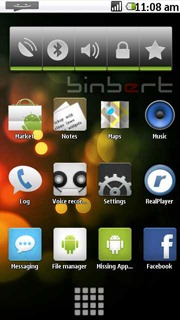
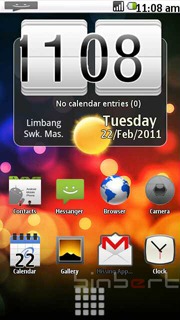
Install Android 2.1 UI on Nokia S60v5 mobile


Android NokiaAndroid 5800
I was searching for a solution to run android on my Nokia 5230. I found some YouTube videos with tag Android and Nokia. After a long search I found some solution to tweak the user interface of Nokia with an Android. Here are the steps to change Nokia UI to an Android UI on Symbian 60V5. Remember this will change only the User interface. You can always uninstall.
1. Download GDesk.rar from following link
http://www.ziddu.com/download/9183034/GDesk.rar.html
2. Extract  and rename the folder as   “+GDesk”
3. Copy “+GDesk” folder to your phone memory
4. Go to +GDesk\Gdesk v0.33g Install SIS And install all applications, files listed below
GDesk.0.33g.SIS
GDeskAgnViewS60.0.33g.sis
GDeskClockS60.0.33g.sis
GDeskInfoViewS60.0.33g.sis
GDeskNotepadS60.0.33g.sis
GDeskShortcutsS60.0.33g.sis
GDeskTaskManS60.0.33g.sis
Normally Phone will not allow you to install GDeskTaskManS60.0.33g.sis. It will give following error
Certificate is expired
You have to sign the application and install it
How can you sign an application? Generate a certificate using this site and sign it.
Or try a self signing application  using application called FreeSigner
5. Now run GDesk from your installed applications.
6. Tap your screen, then click on Design >>  Load Design
select Android 2.1.gdd from your phone
Location : Memory card\+GDesk\Android 2.1.gdd
7. Now go to options and tick following option for better result
Replace Main
Full Screen
Hide title caption
Disable menu tap
It is compactable with Nokia 5230, 5800, 5235 and 5233


read more →

Use Android Device as a Remote Controller


Use Android Device as a Remote ControllerWhat if you can use your Android Handset as a controller for your computer means moving mouse gestures with your android device and controlling the keyboard it would be fun you can use your mobile + use it as a remote control for PC stuff so we will use ANDROID VNC which will help you to control your conputer screen from anywhere with just your android device well for this to work you need to have VNC client installed on your computer I would suggest you to Google Real VNC for Windows and x11 VNC for Mac so google them up and install them to use your android device as a Remote Controller.
Link to AndroidVNC
read more →

Hack Facebook with 3 Trusted Friends Method

Well there are many techniques for hacking out Facebook Password well these include Phishing Attacks, Keylogging and other Social techniques but today we are going to see how to hack passwords using new feature introduced by Facebook the 3 Trusted Friends Password Recovery Feature in this what happens if you have lost your password and you don’t have any access to your default email address than this feature will handy by sending request to your 3 trusted friends and hence gaining your account password again.
For this technique you need to create 3 fake Facebook account and you need to surely add these as friends into your victims account whose account you are going to hack.
After succefull addition of your fake accounts into victims account as friends follow the below steps .:
1. Go to Facebook and click Forgot your Password ?
Hack Facebook with 3 Trusted Friends Method
2. Than you will get something like below just enter the details you know about him enter his Username, email address and full name.
Hack Facebook with 3 Trusted Friends Method
3. After entering everything check it again and click on search.
Hack Facebook with 3 Trusted Friends Method
4. After succeful search for the user Facebook will show some information about how many emails are linked to the account and there is simple option saying No Longer Access to These click that one.
Hack Facebook with 3 Trusted Friends Method
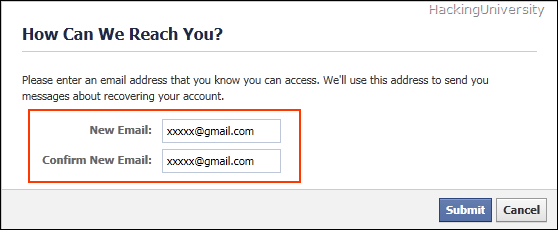
5. Now it will promote you to enter a new email address on which you will get the password resetting option so enter your email address I suggest you creating a Fake or Temporary email address for safety purpose.
Hack Facebook with 3 Trusted Friends Method
6. Than it will promote you to enter the Security well if you have some security guess about that one than that’s ok but if you don’t know it than simply enter 3 wrong answers and it will take you to the 3 trusted friends recovery page like below.
Hack Facebook with 3 Trusted Friends Method
7. Now just click continue and facebook will ask you to choose 3 trusted friends choose the 3 fake profiles of your which you created and added into the victims account.
8. After selecting 3 accounts facebook will send security codes to these accounts just enter these codes and you will get Password Resetting email from Facebook on the account you created in Step 5
That’s it now you are succefull in Hacking Facebook Password with the 3 Trusted Friends Method.
Remember .: this trick only works if 3 trusted friends agree to give youthe security code so its really important that you add your 3 fake accounts into your victims facebook account as a friend.
Hop you enjoyed this tricks if Yes than Subscribe to our Newsletter to get updates directly in your Email Address.
read more →

How to Get Old Facebook Chat Back

Facebook introduced new chat interface, which for some people is really a mess as it is not much comfortable so we are back with another trick to get back your old Facebook chat back follow the below trick to see how it works. Remember this trick uses Firefox web browser and a greasemonkey script so you have download it to enable the script.
How to Get Old Facebook Chat Back

Follow the below trick to get Old Facebook Chat Back .:

  1. Please ensure that you are using Firefox Web Browser.
  2. Download the Greasemonkey add-on for Firefox.
  3. Now install the Facebook Sidebar Chat Reversion Script.
  4. Now you are done with everything, simply login to your Facebook Account and use the old Chat.
read more →

How to use mobile camera as PC webcam


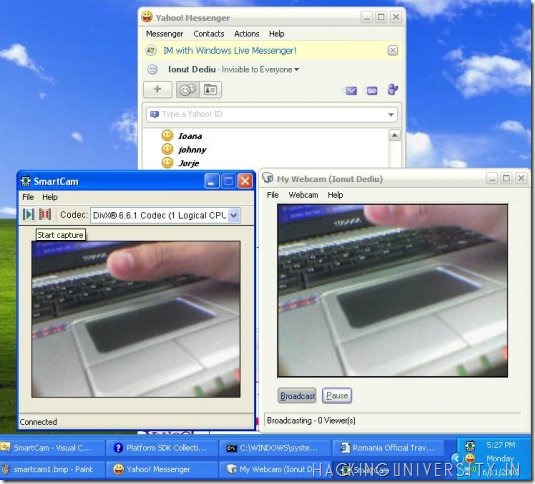
How to Use Mobile Camera as WebcamSmartcam is a small utility which can help you in using your mobile camera as a webcam and it is really handy to use so simply downloading it and installing it will help you in using it.

Follow the below steps to see how it works .:

  1. Download the SmartCam Package ( contains windows setup and all the mobile applications install according to your mobile )
  2. After downloading this above package simply extract it and install setup in PC and app according to your mobile phone.
  3. Now you have both the things installed you can use Bluetooth to connect and use mobile camera as a webcam.
How to Use Mobile Camera as WebcamSo that’s how you can use mobile camera as a webcam, enjoyed this post please +1 and like it above to support us and make us the biggest tech community.
read more →

Bloggers Official Favicon Changer

Bloggers Official Favicon Changer

Bloggers Official Favicon ChangerFavicon as said a small icon representing the firm , the website’s identity in a smaller piece. Its really Important for any website to have its own customized Favicon. Like I have on my Pcx Arena website which has green circle with HU in it representing Pc Arena it can be anything like a word, a image or anything according to the website.
Now earlier people used to put some script containing the URL to your image in the <HEAD> section so that bloggers default favicon can be changed into their own personal favicon even I had done same like this but now blogger has a new feature called change favicon which is right there present in the Page Elements section.
Now the main thing is that everyone may not be able to view that option in the blogger default view. But you have to choose Blogger in Draft from the footer of blogger dashboard for using that option.
Follow the below steps to change blogger favicon with official blogger in draft tool .:
1. First of all change your default blogger template to the Blogger in Draft one by scrolling down to its footer and clicking Blogger in Draft like below .:
Bloggers Official Favicon Changer
2. Now just go to design and you will see the default Favicon Changing Option .:
Bloggers Official Favicon Changer
3. Now in the above image you can see I am having Favicon editable option with which I can change my default blogger favicon to the one I want for my own website.
4. Now simply click on edit option which is @ the right side of Favicon and you will see something like below .:
Bloggers Official Favicon Changer
5. Click Browse and select a .ico file you can Google on how to create a .ico file or use Photoshop to create one for your website now simply click update and that's it. You have successfully changed your Blogger website favicon
read more →

Windows Live Writer Backup Utility

Windows Live writer is a very popular blogging software used by many professional blogger. Its customizations, plugins and many daily used features makes it the best and free blogging software from Microsoft. Now as you do lots of blogging from one software you normally capture and store data on one computer, which can be dangerous if you have a lose or any outer damage to that computer you will loose all the data or if any case you wanna migrate or duplicate the data on another computer this post will help you out.
Live-WriterYesterday I just bought a new Dell Xps15 Laptop and I am really impressed by its design and i5 Processor so I was really confused on how to transfer Windows Live Writer data from older i3 Computer to this new one laptop as I had many automatic linking stuff and much more I just needed the best all in one utility to backup everything from plugins to settings so I came across Windows Live Writer Backup Utility. So follow the below steps to get to know how to backup and restore your Live Writer’s Data.
Procedure for Backing Up Live Writer’s Data .:
1. Download Live Writer Backup Utility ( Click Skip Ad after clicking )
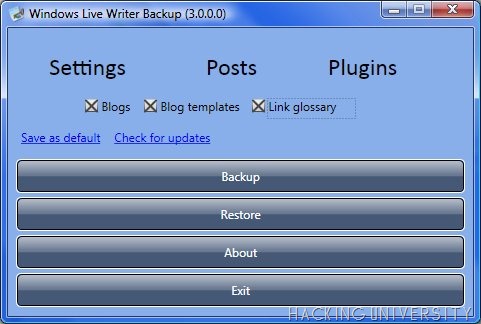
2. After downloading this utility run this application as an administrator on the PC on which you had installed Windows Live Writer you will see something like below .:
Windows Live Writer Backup Utility
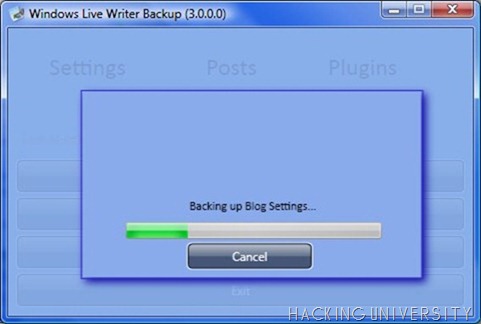
3. Now from here you can choose what things you wanna backup from your Live Writer Application. Simply select and click Backup, Just give a name to your Backup and it will process your backup like below.
Windows Live Writer Backup Utility
4. Now you will have your Backup file where ever you stored it on Desktop or where ever. Now you have safely backed up your Settings for Live Writer.
5. Now if you want to transfer these settings to another Pc running Live Writer just move the backup to that computer and install live writer backup utility to that computer as well now just open the utility as an administrator and click restore as you see in the 1 image.
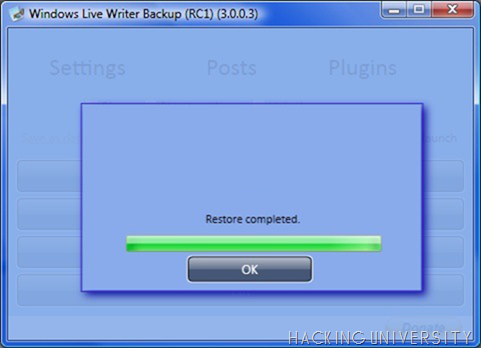
6. It will process your Restoration and simply give you success with the restoration process like below .:
Windows Live Writer Backup Utility
That’s it guys the simple way to Backup and Restore your Live Writer Settings hope you all got it but if you have any problem or query just comment below and I am always there to help you out.
read more →

Facebook Custom Message Prank

Facebook Custom Message Prank

Facebook Custom Message PrankThis prank can be used to display a custom message on Facebook hence fooling your friends making them think that you had hacked their Facebook account. This is a loophole in Facebook so follow the below steps to know about this prank better.
Procedure for Custom Message Prank in Facebook .:
1. Open your web browser
2. Now copy and paste this below URL into your address bar  .:
https://www.facebook.com/connect/connect_to_node_error.php?title=YOUR TITLE&body=YOUR MESSAGE
3. Now simply change the above red lines to your desired ones like below .:
https://www.facebook.com/connect/connect_to_node_error.php?title=Flickyinfo.co.cc&body=Account Hacking By. Flickyinfo
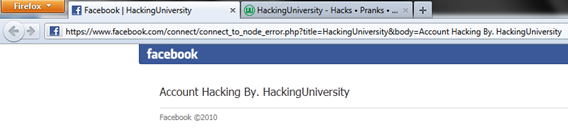
4. Now if you will click enter you will see the page like below .:
Facebook Custom Message Prank
5. The last step is to share this URL with your friends now no one will click on the URL with the following title and message which is visible by hi so we will simply short this URL and them simply share
6. Now go to www.goo.gl it’s a Google URL shortening service which is great as it gives you all the data about how many times its clicked.

Here you go with your own custom Facebook Message Hack so enjoy this trick and share our website with your friends
read more →

25 Daily Free Backlinks For Your Website

25 Daily Free Backlinks For Your Website

25 Daily Free Backlinks For WebsiteBacklinks can help you increase your websites rank getting you on top in the search engine, which is really good for the SEO so today we will discuss about a free service called SocialMonkee it’s a free service which helps you to make 25 backlinks to your websites content everyday.
The process is really simple just follow the below steps and you will through this service .:
1. Just register @ SocialMonkee
2. Than Verify from your registered email address and move forward to SocialMonkee website.
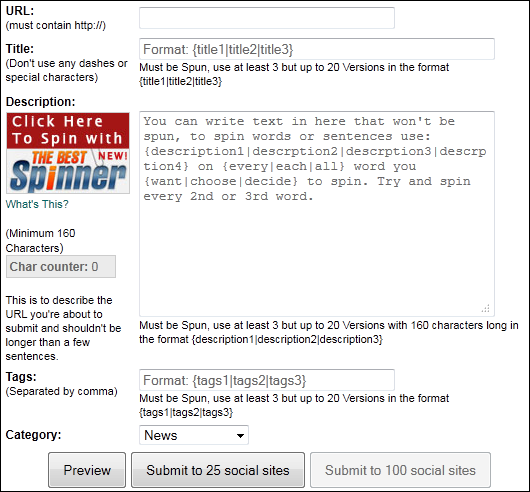
3. Currently you are a free member that means you get 25 backlinks everyday and a limit of submitting 1 URL so that’s not a problem for a free one so now you are on dashboard just click on Download Plugin/Submit like below .:
25 Daily Free Backlinks For Website
4. Now you will see page like below just add all the information about the link you are submitting.
25 Daily Free Backlinks For Website
5. Add the title of the URL you are submitting, add the URL, and simply add Tags and description and category and click Submit to 25 social sites that’s it not it will process your request and submit your URL within 24 Hours.
Enjoy Free Backlinks with SocialMonkee.
read more →

How to Update Strangers Status in Facebook

How to Update Strangers Status in Facebook

How to Update Strangers Status in FacebookFacebook is the one and all social networking service which people all over the world use to communicate with all their friends and family members, they share happiness and everything with all their homies so what if you have the power to Update anyone's Facebook status and have some FUN with him.
NOTE : Now this post is just for educational purpose you should attempt this on any innocent as this would be a serious crime.

Follow the below steps to Update Status in Facebook .:

1. The trick we are going to use here is from the post .: Sending Fake SMS
2. you need to know how to send fake SMS so check the above post and then follow the below steps .:
3. Now you know about the SMSGLOBAL from the above post just open the send SMS to number from SMSGLOBAL Dashboard like Below and put .:
+919232232665 in the Send SMS To Field.
and
+91xxxxxxxxx in the Sender id From field ( this is your victims number ).
4. This trick only works if victim has registered his mobile number to get notifications from Facebook so to get the victims number if he is your friend just go to the info tab on his profile and get the number from the mobile number section.
5. Now add this number to the Sender id From field.
6. Now head over to message adding field and type the funny message you want victims current status to be.
7. After adding the message just check all the fields should be right and make sure you have added +91 before both the numbers above now just click the Blast !!!Button oh I mean Send Button and see the magic.
8. Now go to Facebook.com and check your victims current status , now you know what to do just comment and Like his status to encourage him.
read more →

10 Exclusive Tricks For iPhone

10 Exclusive Tricks For iPhone

Below are some of the best and exclusive tips right for your iPhone just have have a look @ all of them may you get some best usability from them.
1. Enabling parental Control .: parental control is really useful when you want to apply restrictions to your child on what he is accessing from his iPhone. You can restrict Music, Photos, Videos etc.
Go to Settings > General > Restrictions.
Simply enable it and enter the 4 digit passcode you are done now just restrict apps you want to.
2. Email Multiple Images .: you can email multiple images by going to.
Photos > Select the album you want to use > Tap icon on the bottom left > Select up to 5 Photos > now you can simply share, copy or delete.
3. Scroll to Top .: running any application or browsing contacts if you want to directly go on top than there is simply touch to go up option. When you are down in some app simply touch the above status bar and it will slide you back to top.
4. Adding words to dictionary .: some words may not be recognized by your iPhones as they can be from your native language but if you are typing something in notepad and you typed it something for 5 times than that word is automatically added into your dictionary.
5. Quick Delete Trick .: you can a great deleting feature in iPhone by simply touching and selecting all the stuff you wanna delete and than simply deleting than up but if you wanna quickly delete than there is simply quick trick just swipe that word or email or anything a notepad file it will give you a option to delete that single file easily.
6. More special Characters .: if uou want to add some stylish letter than simply hold that letter like A or B than you will see many more letters from that word will just Pop Up in front of you.
7. Street View for From Google .: Search for a city like New York or anything > Afterwards you will see a little orange badge > Tap on that badge to get Google Street View. That’s it now Impress your friends.
8. Soft Reset .: Press and hold Power and the Home Button together for few seconds than your iPhone will reboot.
9. Battery Saving Tips .: iPhone sucks @ the battery point of view so check some Tips below to save some amount for the future use.
  • Go to Settings > Brightness > Dim your screen to 50 % approx.
  • Go to Settings > Mail,Contacts,Calendar > Fetch New Data > Make it manually.
  • Turn off 3G by going to Settings > Network > Enable 3G and Slide it to Off.
  • Bluetooth should also be switched off @ the time you don’t need it General > Bluetooth > Slide it too Off.
10. Mute Ringer .: when a call comes both ringer and vibration goes on just press the Sleep button ones to silent it and press one more time to make it busy.
So that were some of the Tricks to get your iPhone experience into a smooth road and help you have more fun Smile
read more →

SpeedyFox: Firefox Speed Booster

SpeedyFox: Firefox Speed Booster

FirefoxIs your Firefox working slow. Does it opens in a lazy manner and slows down your work than we have a special tool for all of you SpeedyFox, is a simple utility which compresses all the saved Firefox data hence making its speed a lot better.
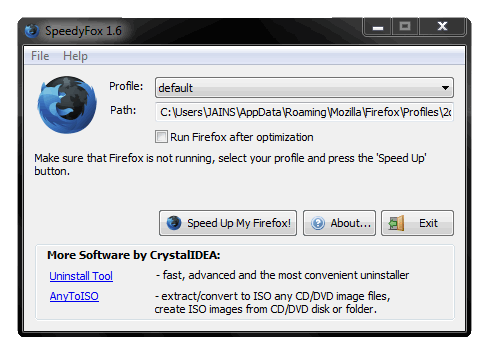
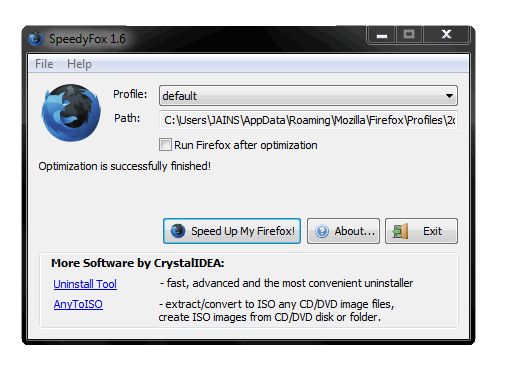
Whenever you install Firefox it always opens faster but as the days passes its files with huge data which makes Firefox slow so here comes the role of speedyfox to compress the data and make your Firefox faster and smoother.

Features of SpeedyFox .:

1. Boosting Firefox startup speed upto 3 times.
2. Boosting Browsing Speed.
3. Quicker Operation with Cookies.

How to use SpeedyFox .:

1. After Downloading SpeedyFox Run it.
2. You will a window like below just click on Speed Up My Firefox ! ( Remember Firefox should be close )Capture
3. Now it will run its process and within sec it will complete and give you success message like below now just enjoy faster Firefox.1

read more →

nday, June 19, 2011 Earn 5 Dollar For Every Successful Task

Earning 5 Dollar maybe not easy but what if you only demand for the work you like and you get paid for that stuff, YES that’s right now with Fiverr you can earn $5 for every task you complete.
Fiverr is a place where you tell people what you can do for them just for $5 there is nothing like increasing and decreasing in prices but but you only work for $5. You can demand as many task as you want as soon as you demand your submission will be submitted with them.
Now if someone likes your task and he wants to order that thing than he can simply click Order This and you will get a email containing all the details so now you can work for that person and get $5 for the completion of that work.
Earn 5 Dollar For Every Successful Task
From the above image you can see that you just have to come with a cool idea and that simply create your task which is called GIG, Now you can promote this on Social Networking websites to get more person for your task now just earn money after you complete your work.
Creating GIG is simple just fill all the details like below in the image and click Continue.
Earn 5 Dollar For Every Successful Task
Now simply fill all the details about your Task like description, Tags , Category etc.
That’s it guys' you can simply earn $5 for every task you complete. So now just boost your energy level and make some easy money.
read more →

Get +2500 Backlinks For Your Website For Free

As I posted in my previous SocialMonkee post that how you can get 25 free backlinks daily and about the importance of backlinks so we are back with another +2500 backlinks creating Post its for free and just requires you to enter your website URL its Keywords and that’s it after clicking submit your website will be Pinged and submitted to +2500 websites getting you unique backlinks and increasing your website rank in alexa.
How to us this service .:
1. Just visit this Website
2. And you will something like below .:
Get +2500 Backlinks For Website For Free
3. So you can see in the above image how I have added my website URL and some Keywords and select how many pages you wanna ping you can live it blank to select all.
4. Now simply click submit and see how pinging starts below means backlinks are being created, remember do not interrupt till it counts to 2500.
Get +2500 Backlinks For Website For Free
5. So in this way way you can create +2500 free backlinks and enjoy higher rankings in search engines.
read more →

VLC Media Player Hidden Tips and Tricks

VLC Media Player Hidden Tips and Tricks

VLC Player Hidden Tips and TricksVLC is the most popular media player used by many people all over the world. It has all the popular codecs which helps you to play any kind of major video files.
1. Ripping DVD’s: VLC player can be used to Rip DVD’s in a very easy manner. To rip any dvd just go to media menu and click covert/save. Now just specify the file name and the format and click save.
2. Record Videos: with the new VLC player you can record any videos during playback. Accessing record button just go to view > advanced menu > record button. Now when movie is playing clicking this button will start recording and clicking it again will stop the recording.
3. Playing .RAR Files: yes that’s right this trick may shock you out but VLC player can seriously play the .RAR files simply load it and it will play.
4. Play in ASCII mode: VLC media player can play files in ASCII mode. To play in ASCII mode, Go to Tools > Preferences > Open the video section and choose color ascii mode and click save and now play.
5. Listening Online Radio: vlc media player also includes online radio stations you just need to enable it through Media > Services Discovery > Shout Cast Radio Listings. Now you can open playlist and browse it.
6. Converting Audio and Video Formats: in vlc player you can convert audio and video formats simply going to Media > Convert/Save. Now simply add the file and choose the output format and click save.
7. Download YouTube Videos: simply grab the YouTube video url and paste it in the Media > Open Network Stream > Paste the URL and click Play.Once VLC starts streaming the video, click Tools>Codec Information and at the bottom of the window you will see a Location box. Copy the URL and paste it on your browser’s address bar. The browser will now download the file which you can save it to your hard disk. Alternatively, you can record the video.
read more →

How to test your Anti-Virus Program

How to test your Anti-Virus Program

How to test your Anti-Virus ProgramAnti-Virus is the main protecting shield for your PC. People who use to surf continously may have a high dangers from getting infected online. So Anti-Virus program must be configured correctly so now if you want to check if its really configured ok or not or want to check about how its working than we have a solution this thing.
Follow the below steps to check your Anti-Virus Working easily .:
1. Open Notepad and paste the below line into it :
X5O!P%@AP[4PZX54(P^)7CC)7}$EICAR-STANDARD-ANTIVIRUS-TEST-FILE!$H+H*
2. This above text line or testing agent is created by the EICAR Company so now just try to save this file as anything.
3. If your Anti-Virus program is working great than it will not allow you to save this above file and ask you to delete it, and if it does not give any warning about the file than its simply not working and you have install another one.
read more →

Re-Enable Services After Virus Attack

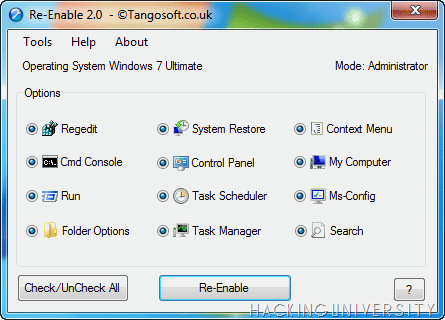
As you know these days as virus attacks PC it shuts down some essential services which lead to many small errors due to services disabled so today we are going to show you a brand new tool called Re-Enable which can re enable any disabled service after a virus attack hence making your PC again fit and fine.
This tool will help you to fix any errors and making services live again, no coding required it’s a simple application which you will download and simply run and select re-enable like in the below image.
Re-Enable Services After Virus Attack

So now just run this small software and select services which are currently disabled on your system and click Re-Enable and they will simply be Re-Enabled so enjoy this software and download it from below.
Remember to right click and run this software as an administrator in Windows 7 and Windows Vista.
read more →

Friends Wall Flooding with Status in Facebook

Friends Wall Flooding with Status in Facebook

As the name sounds you all will be keen to know a how it really works is there any software is it really easy to flood. Well all I have to simply say that its really easy to flood and you will have fun flooding your friends wall. So with this flooding trick we will be able to post bulk status updates on your friends wall hence grabbing his attention and pissing his ass.
We will use a simple AutoClicker software to automate our clicks which will boost the speed of clicking giving more space for more status to fit in.
Follow the below steps to flood your friends wall .:
1. Download AutoClicker Software From HERE
2. After download this software just open m.Facebook.com in your desktop browser and just sign in. ( This trick only works with Facebook's mobile version so its dam important step to follow )
3. After signing in you will something like below .:
Friends Wall Flooding Trick Facebook

4. Now search for the friend whose wall you are going to flood.
5. Now just open the software and you will have the below interface the red lined box below is the number of clicks box which you can alter according to your preference ( Do not change rest of the settings )Friends Wall Flooding Trick Facebook
6. You can start Auto Clicker with a shortcut key F2 and to stop you can click Esc.
7. Now go to your friends wall and type the message you wanna flood I am writing “Hello Wats Up !!!” as this is my favorite quote.
Friends Wall Flooding Trick Facebook
8. Now after writing the message you wanna flood just check that software is running and take your mouse to the post button don’t click it and press F2 your clicks will spamming your friends wall with your message and he will now abuse you like a shit. ( Just tell him that you are doing this for Fun )
Friends Wall Flooding Trick Facebook
9. Now press Esc. when you think messages are enough for today lets do rest tomorrow Muhaha….. Just jocking that’s it now you know how to flood anyone’s Facebook Wall.

DISCLAIMER .: The post is for educational purposes only ! “PC Arena" is not responsible for any kind of loss or damage. Its is considered as illegal, Do this @ ur own risk.
read more →

Convert Java App into Android App

Many of you use .jar or .jad apps because of the mobile compatibility and those apps are great like they have some of the bets app which you don’t get in android so today we will see an online converter which can convert your java apps into android package which off course you can use in any android phone.
Follow the below steps to see how to convert java apps into android apps .:
1. First Go to this WEBSITE

2. Now simply all the details in the form which will look something like below .:
Convert Java App into Android App
3. They have 2 options the first is good and preferred by most of the converters so just give the direct link to your java app than customize below options for Display, Screen Size etc. and click Get Apk
Enjoy everyone this tutorial has ended here but more tuts and tricks are on their way to this blog so just subscribe to our Newsletter and stay Updated.
read more →